What is Dynablaster?

bomberman-icons-1

Dynablaster is a small package of custom Dynamo nodes, developed to reuse short concatenations of nodes that appear frequently in everyday Dynamo workflows. It is focused in Revit data management rather than in complex geometry generation.

Mostly built with Out Of The Box nodes, DesignScript is used to “compact” the definitions in  pursuit of writing the shortest possible code for a given purpose. Motivated by the great community of Dynamo users, the author is learning Python to improve his skills and will implement it on Dynablaster Nodes at some point.

There are a group of nodes related to Dyno Browser plugin. These nodes help generating the Json configuration file. The functionality however, is limited. The author has no affiliation with the developers of Dyno Browser.

Dynablaster was the name for the european distribution of the old videogame “Bomberman”: https://en.wikipedia.org/wiki/Dynablaster

Enumeration

EnumerationNode

Feed a List into this node and it will return a number range, starting at 1 and up to the total count of the given List.

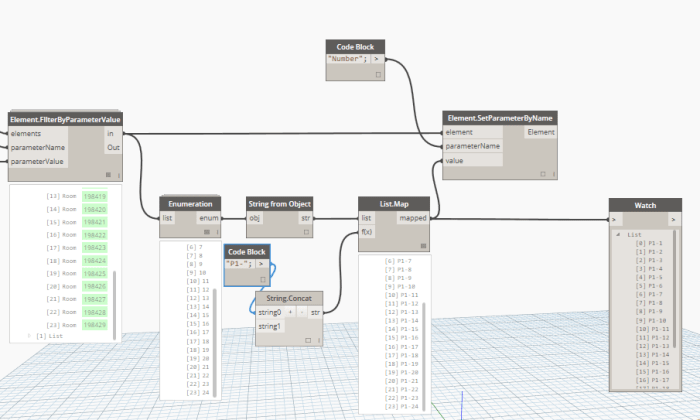
Useful to renumber Revit elements, as in this example, where it helps generating the numbering of certain Rooms in the model:EnumerationWorking

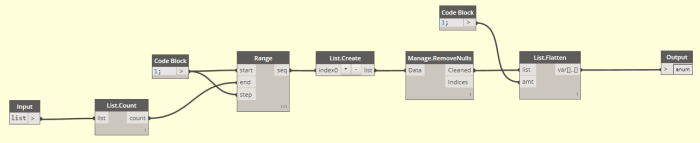
It is built mainly with OOTB nodes and one custom node. It operates a Count method over the list object, and using this value to generate a number range from 1 to the obtained count. Last implementation avoids unexpected behavior when the input list is empty. In that case, now the output is an empty list.

EnumerationRevampedInside


Workflow: Send List of DYF Node Names to Clipboard

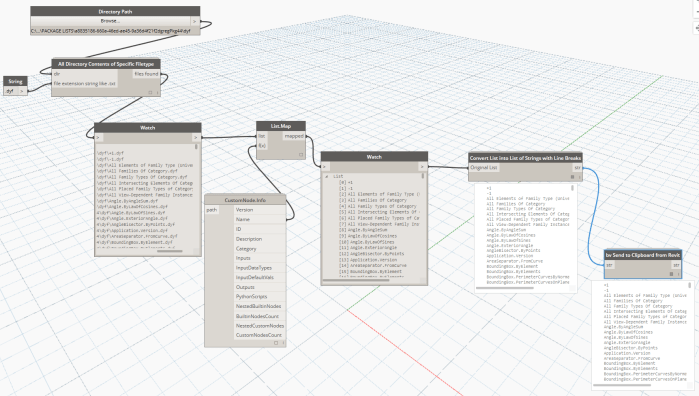
In this workflow, you simply input a Directory Path and it will get all the node names of the DYF files in that folder, and send them directly to Clipboard. For the Clipboard integration to work, it must be run from a Revit-Dynamo instance (not in Sandbox mode).

Workflow Send List of DYF Node Names to Clipboard

Following this, you can switch to another application and use Ctrl+V to Paste the data. If you want to create tasks in Asana from these line items, paste it temporarily in Notepad and then Cut-Paste 100 items at a time directly into the Asana task list.

DYN: https://www.dropbox.com/s/nyq6cbortyne24e/Workflow%20-%20Send%20List%20of%20DYF%20Node%20Names%20to%20Clipboard.dyn?dl=0

CustomNode.Info

This will take the File  Path to a dyf file as input, and return many properties of that node. In the example below, List.Map is used to iterate through and return only the Node name.

Custom Node Info

Element.FilterByParameterValue

This node gets a list of elements [list], a parameter name[string] and a parameter value [].

Checks if the elements parameter is equal to the given value, and splits the elements list in two: the first been “true” and the second been “false”Element.FilterByParameterValue

This node is built using OOTB nodes with nothing special in it.  But sumarizes a task we do in almost every definition.

Element.FilterByParameterValue_inside

Here follows a little example of this node in action:

We input all the rooms in the project, then get only those having “Comments” parameter equal to “revestir”Element.FilterByParameterValue_inAction