
This node reports the Level an Element is associated with:

This node reports the Level an Element is associated with:
This node allows you to select objects by simply specifying a Level as input using the Levels node:


This node requires Floor objects that have been populated with a Comments parameter as an identifier. In the workflow example below, a linked model contains the Floors. These are selected and filtered to the specific Level and identifier, and with that one Floor object in hand, the Dynamo script goes on to make a Section Boxed 3D View around that Floor, Set its Name, and Set a View Template to the newly created view.

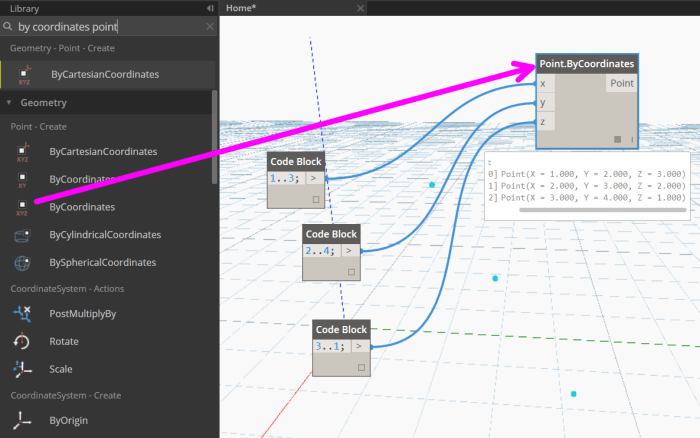
Form a Point given 3 Cartesian coordinates.
This was developed as part of the workflow to convert Rooms to Floors. Revit needs ModelCurves, but to get there Dynamo needs to make Polycurves from the Room boundary. Simply send a list of Rooms as input:

In this workflow, you simply input a Directory Path and it will get all the node names of the DYF files in that folder, and send them directly to Clipboard. For the Clipboard integration to work, it must be run from a Revit-Dynamo instance (not in Sandbox mode).
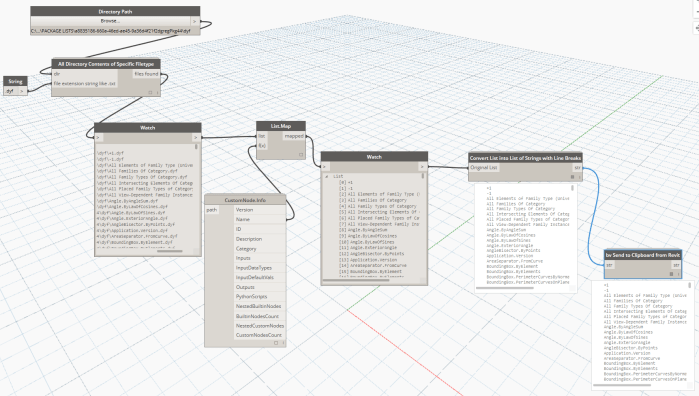
Following this, you can switch to another application and use Ctrl+V to Paste the data. If you want to create tasks in Asana from these line items, paste it temporarily in Notepad and then Cut-Paste 100 items at a time directly into the Asana task list.
This node will take a List as Input and convert it into a single string object, where each new line was an item in the original list. This can be used to take list data from Dynamo, put it into a string, and send it immediately to the Clipboard, as shown in the example below.

This will take the File Path to a dyf file as input, and return many properties of that node. In the example below, List.Map is used to iterate through and return only the Node name.

This will check a directory for files of a given filetype, then pass a flat list of files that have that extension. In the example below, all files with the .dyf extension are listed from the Directory Path. This can be run in Dynamo Sandbox mode.

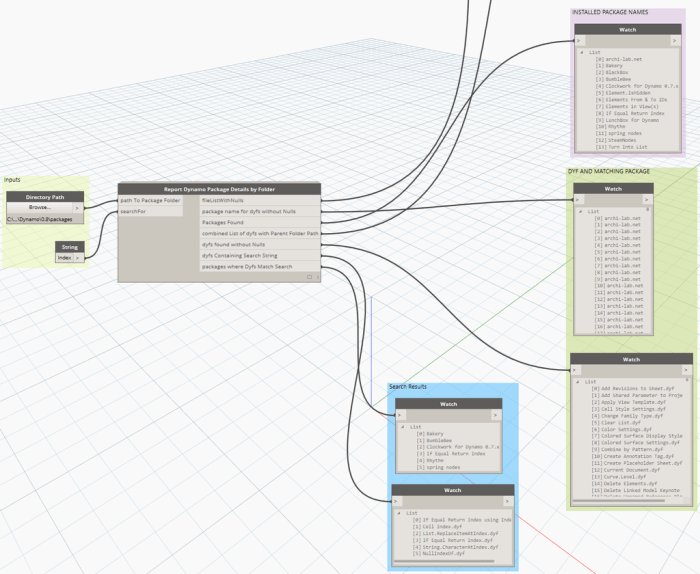
This will give you a summary of nodes you have installed in your Dynamo Packages folder.
Source: https://twitter.com/lukeyjohnson/status/657367093113933824
 Dynamo Nodes