
Does what it says on the box… takes no inputs and just changes all Sheet Names to upper case.
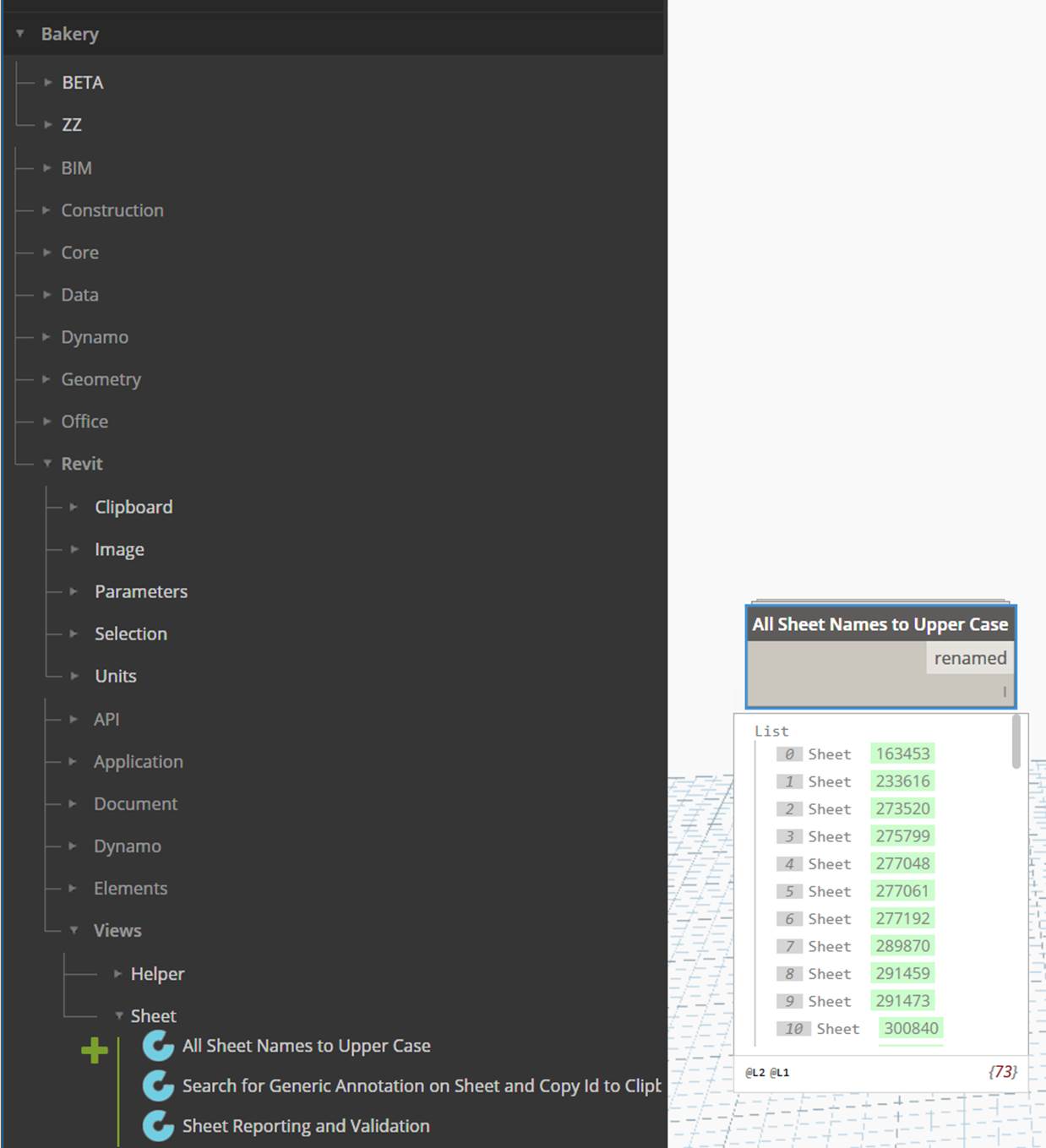
Does what it says on the box… takes no inputs and just changes all Sheet Names to upper case.

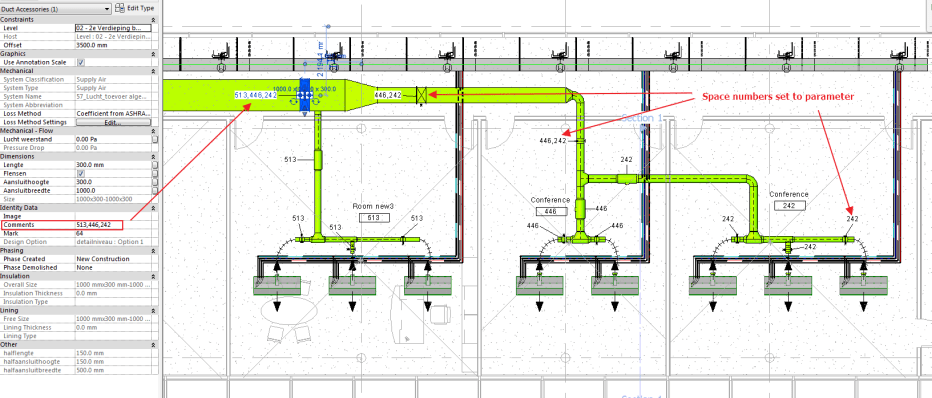
Revit has a built in function that can let you know in which space an air terminal is located. Rhythm has a great node: ‘Element.Space’ for this. Unfortunately most other elements that you’d like associated with a space don’t have access to this space information. The node ‘Space number to network concatenate’ can assign the air terminal’s space number to every upstream element in the connected duct network. While traversing it will concatenate every space number into the parameter with a comma.
The node will stop traversing once it can no longer find an opposing flow direction, encounters a different system classification, encounters an element it has already encountered (and thus has entered some kind of loop) or there is nothing connected to the current element.
Inputs:
Output:
The node can be found in the MEPover package version 2017.2.13 and up.
Created by Taco Pover, MEPover is a package for working with MEP elements and focuses on creating pipes, ducts, cable trays and conduits and extracting MEP-System information.
For most of the nodes more detailed information can be found here: MEPover nodes
Current Node List:
| CableTray.ByLines | Creates CableTray by Lines, CableTrayType, Level, Width and Height |
| Conduit.ByLines | Creates conduits by Line, ConduitType, Level and Diameter |
| Duct or pipe systems all elements | Returns all the elements in the provided systems |
| Duct upstream components by category | This node will try to return the connected elements in the upstream network. It will stop once it encounters an element twice or encounters a different system classification or cannot find a connector with an opposing direction. The output can be filtered by input Categories |
| Duct upstream components | This node will try to return the connected elements in the upstream network. It will stop once it encounters an element twice or encounters a different system classification or cannot find a connector with an opposing direction. |
| DuctRectangular.ByLines | Create ducts by Lines, DuctType, MechanicalFittingType, Level, Width and Height |
| DuctRound.ByLines | Create round Ducts by Lines, DuctType, SystemType, Level and Diameter |
| Elbow.ByMEPCurves | Takes in a list of MEPCurves (pipe, duct, cable tray, conduit) and will attempt to create elbows where possible. A margin can be entered for max distance between connectors |
| ElectricalCircuit Get Panels and Elements | Returns the Panels and Elements belonging to the given electrical circuits |
| ElectricalFitting connector count | Returns the number of connectors on the cable tray or conduit fitting |
| Element.ConnectorSystemType | Returns the MEP System Type of the connectors of the element |
| Element.Domain | Returns the domain of connectors on the element i.e. (domainHvac, domainPiping etc.) |
| Element.ElectricalCircuit | Returns the electrical circuit of the element |
| Element.System | Returns the mechanical or plumbing system of the element |
| Elements in view by category | Returns all the elements in the selected view(s) by the selected categor(y)(ies) |
| Family types of family | Returns every family type of the given Family |
| GetParameterAsProjectUnits | Returns the parameter value in the same unit type as the project settings |
| GetParameterAsValueString | Returns the parameter values without conversion to the revit internal unit system. The suffix boolean toggles the project units on or off |
| Mechanical System Graphic Override set LineColor | Sets the linecolor of the mechanical system graphic override |
| Mechanical System Graphic Override set LinePattern | Sets the line pattern in the mechanical system type’s graphic override |
| Mechanical System Graphic Override set LineWeight | This will change the lineweight override of the mechanical system type |
| MechanicalFitting info | Gets the fitting Part Type and number of connectors |
| MEP connector info | Returns location, connector info and connected elements |
| MEP Curve connected fittings | Returns the fittings, ducts accessories and terminals connected to the given duct, cable tray, pipe or conduit. Also return air terminals on Ducts |
| MEP Fitting connected MEPCurves | Returns the pipes, ducts, conduits or cable trays that are connected to the given fittings |
| MEP Fitting TakeoffFitting (Tap) | Create a new TakeoffFitting or Tap by takeoff pipe and through pipe |
| MEPFitting.ByMEPCurves | Creates a UnionFitting or ElbowFitting by 2 MEPCurves (Ducts, Cable Trays, Pipes or Conduits). |
| Pipe.ByLines | Creates a pipe by Line, PipeType, SystemType, Level and Diameter |
| Room or Space reset center location | This node will attempt to reset the location of the room or space to its default center location |
| Rooms place automatically for all levels | This node will attempt to create rooms automatically for every level |
| SetParameterAsProjectUnits | Sets the parameters by project unit inputs, no need to convert to Revit internal units first. |
| SetParameterSetValueString | Sets the parameters by strings. Useful for setting numerical values that are affected by Revit’s internal unit conversion. Does not work for parameters that are stored as elementId |
| Space number to duct network concatenate | This node will attempt to write the space numbers to connected duct objects in the network. Input AirTerminals need to be placed in spaces. ParameterName is the parameter to write the space number to. Numbers will be concatenated if they serve multiple spaces. Multiple Categories supported |
| Space number to duct network | This node will attempt to write the space number to connected duct objects in the network. Input AirTerminals need to be placed in spaces. ParameterName is the parameter to write the space number to. Numbering stops when it encounters an element from another space. Multiple Categories supported |
| Tag Get Location | Returns the location of the tags |
| Tag Get View | Return the view on which the tag is placed |
| View.GetCropBoxCurves | returns the curves of a view crop box, even irregular shapes. Returns an empty list if the crop view is not active for a given view |
| View.SetCropBoxCurves | Input views and lists of curves to set the view crop regions |
| View.ViewRange absolute | Returns the 4 view range values relative in absolute Z values |
| View.ViewRange relative | Returns the 4 view range values relative to the view’s level |

I have just added two nodes to the Data-Shapes package:
The names of the nodes are pretty explicit: they gather elements in linked documents visible in a host view.
GetLinkedElements.ByHostView uses the visibility settings of the host view when collecting the linked elements, whereas GetLinkedElements.ByHostViewAndCategory allows you to set the categories you’re interested in collecting.
Both nodes can be found in Data-Shapes Package (version 2017.02.20).


Created by Simon Moreau, DynamoMEP is a package for working with MEP elements, Rooms and Spaces. Note: These nodes are distributed in a dll, not as dyf files.
Current Node List:
| Group.PlaceGroupInstance | Place an instance of a Revit group |
| Group.FromElement | Create a group from an Revit group |
| GroupType.FromElements | Create a Revit GroupType from a set of elements |
| GroupType.FromElementsAndName | Create a Revit GroupType from a set of elements and a name |
| GroupType.FromElement | Create a GroupType from an Revit GroupType |
| Space.ByPointAndLevel | Create a MEP Space based on a location and a level |
| Space.ByPoint | Create a MEP Space based on a location |
| Space.FromElement | Create a MEP Space from an existing MEP Space |
| Space.GetIdentificationData | Retrieve a set of properties for the Space |
| Space.BoundaryElements | Retrieve space boundary elements |
| Space.Level | Retrieve the space associated level |
| Space.LocationPoint | Retrieve the space location |
| Space.IsInSpace | Determine if an element lies within the volume of the Space |
| Space.Grid | Return a grid of points in the space |
| CustomRoom.ByPointAndLevel | Create a Room based on a location and a level |
| CustomRoom.ByPoint | Create a Room based on a location |
| CustomRoom.FromElement | Create a Room from an existing Room |
| CustomRoom.GetIdentificationData | Retrieve a set of properties for the Room |
| CustomRoom.IsInRoom | Determine if an element lies within the volume of the Room |
| CustomRoom.Grid | Return a grid of points in the room |
| CustomRoom.BoundaryElements | Retrieve room boundary elements |
| CustomRoom.Level | Retrieve the room associated level |
| CustomRoom.LocationPoint | Retrieve the room location |
| CustomRoom.Windows | Retrieve windows around the room |
| CustomRoom.Doors | Retrieve Doors around the room |
I recently sliced off a few nodes focused on package management and have placed them in a new package called RollingPin.
Current Node List:
Check DYF folder for Dependencies in Package Folders
Get DYF Dependencies for One DYF File
Get DYF Dependencies through Recursion v1
List Nested Node Nicknames for Folder
List Nodes in DYFs for an Entire Folder
Node Names From Directory String
Package Folder Details
Report Dynamo Package Details by Folder
Show Dependency Ids for one DYF
Show Dependency Nodes for one DYF
Summary and Node Search for a Folder of DYFs

Package published by Dale Harrison, InfraBIM.
Current Nodes:
Formwork_Area
Get Active Project Location Name
List Index Concate
Point to String 3dm
Set Project Base Point
Transfrom_Revit_in
Transfrom_Revit_out
XYZ Parameters
Refer to https://infrabim.wordpress.com/category/dynamo/ for more information.
New Dynamo vodcast channel started by Bill Debevc and Ian Siegel at this link. 5 episodes so far.
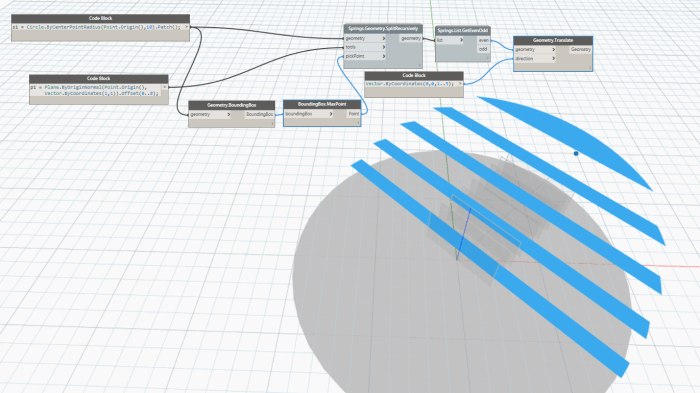
Performing recursive actions with nodes is never easy. You usually have to resort to some form of a script. The below case is a good example of this. It uses Dynamo’s DesignScript language to recursively cut the resulting geometry over and over, until the list of cutting tools is exhausted. For a successful result, the cutting tools have to be sorted in the order of which the geometry should be cut.
Inputs:

Package published by elayoubi.mostafa
Current nodes:
| Add Shared Parameter(s) from txt | Add shared parameters to project from SharedParameter .txt file |
| All Lines of LineStyle | Gets all lines in a project with a giver LineStyle |
| Categories list | Gives list of all Revit categories and a matching list of their names |
| Duplicate Element | Duplicates all types of elements including view templates |
| Element(s) cut | Cutting element(s) with element |
| Export to FBX | Exports 3D views to FBX format |
| Export Views to NavisWorks | exports 3d views to NavisWorks |
| GetLinkedElements.ByHostView | Get all linked elements in host view, following visibility setting of host view |
| GetLinkedElements.ByHostViewAndCategory | Getting all linked elements in host view filtered by categories |
| Grid.SetVerticalExtents | Set the vertical extents of all project grids |
| Line LineStyle | Gives LineStyle name and element of Lines |
| ModificationTracker.AllChanges | Takes ExistingElements Data as input and outputs lists with all geometry/parameter values change combinations . Check out http://www.Data-Shapes.net for more informations . |
| ModificationTracker.GeometryChanges | Takes ExistingElements Data as input and outputs elements with same geometry and elements with changed geometry . Check out http://www.Data-Shapes.net for more infos |
| ModificationTracker.ModelComparison | Compares elements from the current version of the model and a previous version (Current version is the current document by default) and returns existing elements data, new elements, deleted elements and a report. Check out http://www.Data-Shapes.net for more infos. |
| ModificationTracker.ParameterChanges | Takes ExistingElements Data as input and outputs elements with same parameter values and elements with changed parameter values. Check out http://www.Data-Shapes.net for more infos. |
| ParameterGroup List | List of all parameter groups |
| RayBounce On Link Category | Same functionality as raybounce but takes linked model elements of selected category into account. |
| RayBounce On Linked Model | Same functionality as raybounce but takes linked model elements into account |
| Replace viewports by center | Replaces vieports on sheets according to list of points. (0 _0) is bottom left of sheets |
| Select Face (s) (PickObject) | Same as OOTB Select Faces _ but can be used through Dynamo Player |
| Set Active Family Parameter By Name | Set a parameter inside an active family document |
| SharedParameters from txt file | Gets parameters from SharedParameter .txt file |
| SlabShape.AddPoints | Add points to slab shape |
| UI.Boolean input | Creates a boolean input for UI.MultipleInputForm ++ . Check out http://www.data-shapes.net for more infos! |
| UI.ColorInput Data | Create a color selection input for UI.MultiInputForm++ . Check out http://www.data-shapes.net for more infos! Warning : Only works with Revit 2017 |
| UI.DirectoryPath Data | Creates a DirectoryPath input for UI.MultipleInputForm ++ . Check out http://www.data-shapes.net for more infos! |
| UI.DropDown Data | Create data for DropDown input in UI.MultiInputForm ++ . Check out http://www.data-shapes.net for more infos. |
| UI.FilePath Data | Create filepath input for UI.MultipleInputForm ++ . Check out http://www.data-shapes.net for more infos ! |
| UI.Listview Data | Create data for ListView input in UI.MultiInputForm ++ . Check out http://www.data-shapes.net for more infos. |
| UI.MultipleInputForm | Create a form with multiple inputs. |
| UI.MultipleInputForm ++ | Create a form with multiple inputs. |
| UI.SelectEdges Data | Creates a Revit edge selection input for UI.MultipleInputForm++ . Check out http://www.data-shapes.net for more infos! |
| UI.SelectFaces Data | Creates a Revit face selection input for UI.MultipleInputForm++. Check out http://www.data-shapes.net for more infos! |
| UI.SelectModelElements Data | Creates a Revit element selection input for UI.MultipleInputForm++ . Check out http://www.data-shapes.net for more infos! |
| UI.TextBox Data | Create Data for TextBox input in UI.MultipleInputForm ++ . Check out http://www.data-shapes.net for more informations |
| UI.TextNote Data | Create Data for TextBox input in UI.MultipleInputForm ++ . Check out http://www.data-shapes.net for more informations |
| WallSweepOnWall | Creates a wallsweep or reveal on a wall |

Home page: https://data-shapes.net/
 Dynamo Nodes