What is Spring Nodes?

spring nodes logo.jpg
Spring Nodes’ main focus is to improve Dynamo’s interaction with Revit. It’s wider goal is to explore any and all means that can help accelerate BIM focused work-flows. Many of the nodes use either IronPython or DesignScript and can be a good starting point for learning the specific syntax and finer points of both.

The package repository is posted on GitHub under the MIT license. You will also find all the sample files and brief descriptions there, that can further demonstrate how some of the nodes work.

Nobody likes squeaky springs. Therefore your recommendations and ideas on how to improve this package further are always welcome. Please be sure to report any issues or feedback directly to the repository.

Some of the nodes provided in this package have been sprung by existing content, such as the wonderful SteamNodes, archi-lab.net, Clockwork and LunchBox, because every great mechanism could use a spare spring from time to time. The aim is to always improve upon the original content either by enabling additional functionality or opening up new uses. By giving it a new twist, we avoid affecting the original content’s goals and direction.


Lunchbox Node Index

Also see http://provingground.io/tools/lunchbox/
This list includes nodes from \bin\LunchBox.dll

CreateDataSet
CreateDataTable
CreateDictionary
DeconstructPoint
DeconstructPolyCurve
DeconstructPolySurface
DeconstructSurface
DeserializeXML
DivideCurve
DivideCurveByDistance
DivideSurfaceUV
EndPoints
GeometrySplit
GetDataFromTable
GetDictionaryKeysValues
GetExcelFileInfo
GetExcelWorksheetData
GetExcelWorksheetDataByRange
GetTablesfromDataSet
GetValueFromDictionary
GetXMLNode
JSONtoXML
LunchBox Adaptive Component Collector
LunchBox Area Element Collector
LunchBox Attractor
LunchBox Attractor Wave
LunchBox Braced Grid Structure 2D
LunchBox Braced Grid Stucture 1D
LunchBox Create Room by Name and Number
LunchBox Curtain Panel Collector
LunchBox Curve to Arcs by Division
LunchBox Curve to Arcs by Parameters
LunchBox Deconstruct Face
LunchBox Deconstruct Solid
LunchBox Diagrid Structure
LunchBox Diamond Grid by Face
LunchBox Domain Variables
LunchBox Family Instance Collector
LunchBox Floor Element Collector
LunchBox Get Domain
LunchBox Get Parameter Value
LunchBox Grid Structure
LunchBox Helicoid
LunchBox Level Element Collector
LunchBox List Matcher
LunchBox Mass Addition
LunchBox Mass Multiplication
LunchBox MEP Space Collector
LunchBox Mobius
LunchBox Paraboloid
LunchBox Planarize Points
LunchBox Point to String
LunchBox Quad Grid by Face
LunchBox Random Numbers
LunchBox Random Split List
LunchBox Remap Numbers
LunchBox Remove Null Values
LunchBox Room Element Collector
LunchBox Sheet Collector
LunchBox Space Truss Structure
LunchBox Staggered Grid by Face
LunchBox String to Point
LunchBox Structural Framing Collector
LunchBox Torus
LunchBox Triangle Grid by Face
LunchBox Vector Amplitude
LunchBox Vector Angle
LunchBox Wall Element Collector
LunchBox Wave
NumbersToPoint
PointToNumbers
PointToString
RandomizeOrder
RandomNumbers
RangeDivision
RemoveNulls
ReplaceNulls (Manage.ReplaceNulls)
SearchListForString
SelectDataFromTable
SerializeJSON
SerializeXML
ShortestWalk
SortDuplicateStrings
SortPointsAlongCurve
StringToPoint
XMLtoJSON

Directory.Path

This node allows the user to select a Directory by browsing the directory tree of the computer. As shown below, the output of Directory Path is essentially the same as the String path to a Directory.

Manage.ReplaceNulls

This node will take a set of data, such as a list, and replace the null values with a specified value. As shown below, it can work with a dataset of mixed data types, such as strings, integers, and booleans.

archi-lab Node Index

Also refer to http://archi-lab.net/

Note: This list includes some UI nodes from \bin\archilabUI.dll

Add Revisions to Sheet
Add Shared Parameter to Project
Apply View Template
Cell Style Settings
Change Family Type
Clear List
Color Settings
Colored Surface Display Style
Colored Surface Settings
Combine by Pattern
Create Annotation Tag
Create Placeholder Sheet
Current Document
Curve.Level
Delete Elements
Delete Linked Model Keynote Tags
Delete Unnamed Reference Planes
Dispatch
Door Set Handing
Duplicate Item Indices
Element Ids
Elements Fom Linked File in Room
Elements in Room
Elements on Sheet
Export Image by View
Fill Pattern
Filled Region Area
Filled Region Boundary Curves
Get All Detail Groups
Get All Dimension Styles
Get All Elements From Linked Model
Get All Keynote Tags
Get All Line Styles
Get All Revisions
Get All Viewport Types
Get All Views
Get Built In Parameter
Get Design Options
Get Documents
Get Elements by Category/Level
Get Filled Regions
Get Host Element
Get Level by Name
Get Line Style by Name
Get Rooms by Level
Get Sheet Viewports
Get Tagged Element Id
Get Text Note Type by Name
Get Type Parameter
Get Unplaced Groups
Get Views from View Set
Get Worksets
GH Point to DY Point
Group Curves
Id to Element
Isolate in View
Key Schedule
Legend Settings
Level.LevelAbove
Local Printers Names
Marker Settings
Marker&Text Display Style
Mass Addition
New Section Box View By Elements
Override Fill Pattern in View
Parameter Group
Phase Demolished
PolyCurve by Profile Family Type
Print PDF
Remap UV Domain
Remove Revision from Sheet
Rename Files
Revision Properties
Revisions on Sheet
Rotate Family
Schedule Appearance
Schedule Formatting
Schedule Sorting Grouping
Schedule Title Appearance
Schedules on Sheets
Select Model Lines by Style
Set BuiltIn Parameter
Set Type Parameter
Slice String
String From List
Tag Host Element
Tag Text
Transform Origin
Viewport Properties
Workset.ByName

Export Range
Fill Pattern Targets
Fit Direction Type
Image File Type
Image Resolution
Parameter Groups
Parameter Types
Print Range
Print Settings
View Sets
Zoom Fit Type

Get Linked Element from Element Id and Doc

This node takes a String of the RVT Link File name, and a list of Element Ids as Integers, and outputs the matching elements and their location points. It is quite ‘slow’ in processing terms, as it has to collect all element Ids from the Linked document. A similar, faster node in Bakery is Get Linked Element by Link Name Search and Element GUID, but it requires you to know the element GUID first.

Clockwork Node Index

This list from Clockwork 0.8.2 package.

Also see Clockwork on GitHub

+1
-1
All Elements of Family Type (Universal)
All Families Of Category
All Family Types Of Category
All Intersecting Elements Of Category
All Placed Family Types of Category
All View-Dependent Family Instances Of Category
Angle.ByAngleSum
Angle.ByLawOfCosines
Angle.ByLawOfSines
Angle.ExteriorAngle
AngleBisector.ByPoints
Application.Version
AreaSeparator.FromCurve
BoundingBox.ByElement
BoundingBox.ByElements
BoundingBox.PerimeterCurvesByNormal
BoundingBox.PerimeterCurvesOnPlane
Buckyball.ByOriginAndRadius
Category.Subcategories
Cathetus.ByPythagoras
Character.FromNumber
Clipboard.GetFrom
Clipboard.SendTo
Color.Aqua
Color.Black
Color.Blue
Color.ByWebColor
Color.Fuchsia
Color.Green
Color.Grey
Color.GreyscaleByNormalizedValue
Color.Lime
Color.Maroon
Color.Navy
Color.Olive
Color.Purple
Color.Red
Color.Silver
Color.Teal
Color.White
Color.Yellow
CurtainPanel.HostPanel
CurtainSystem.ByFace
Curve.ClosedLoopThroughPoints
CustomNode.Info
DesignOption.DesignOptionSet
DetailComponent.ByCurve
DetailLine.FromCurve
Dimension.SetType
DimensionType.Style
Directory.ContentsAll
DisplayUnit.ToInternalUnit
DividedSurface.AddIntersect
DividedSurface.EvaluateGridNodes
DividedSurface.HorizontalIntersectsByEndpoints
DividedSurface.HorizontalIntersectsByEndpointsAndFunction
DividedSurface.VerticalIntersectsByEndpoints
DividedSurface.VerticalIntersectsByEndpointsAndFunction
Document.ActiveViewFromCurrentDocument
Document.ContainsElementsOfCategory
Document.DesignOptions
Document.IsWorkshared
Document.LinksAndImports
Document.ListBuiltInCategories
Document.ListBuiltInCategoriesByName
Document.ListBuiltInParameters
Document.ListBuiltInParametersByName
Document.LoadFamily
Document.Path
Document.Phases
Document.ProjectInfo
Document.ProjectPosition
Document.SaveAs
Document.StartingView
Document.SynchronizeWithCentral
Document.Views
Document.Worksets
Door.Rooms
Element.AllInstances
Element.AllInstancesAtLevel
Element.AllViewDependentInstances
Element.Area
Element.ByID
Element.ContainsTransparentMaterials
Element.ElevationOfHostLevel
Element.ExternalFileReferencePath
Element.FromDynamoSurface
Element.Group
Element.Host
Element.ID
Element.Inserts
Element.IsOfCategory
Element.IsRelatedToMass
Element.Level
Element.Location
Element.OverrideTransparencyInView
Element.OwnerView
Element.Materials
Element.Name (Universal)
Element.Panels
Element.ParameterExists
Element.ParameterIsReadOnly
Element.PermanentlyIsolateInView
Element.Phases
Element.ResetOverridesInView
Element.SetMaterialParameterByCategory
Element.SetName
Element.SetWorkset
Element.TemporarilyIsolateInView
Element.Type
Element.Workset
Elements.FilterByName
Elements.FilterByParameterValueAndCondition
Elements.GroupByHost
ElementType.Duplicate
Family.IsInPlace
FamilyInstance.AddCoping
FamilyInstance.ByCurve
FamilyInstance.ByPointInView
FamilyInstance.CopingElements
FamilyInstance.FlipFacingOrientation
FamilyInstance.FlipHandOrientation
FamilyInstance.HandOrientation
FamilyInstance.RemoveCoping
FamilyInstance.SetType
FamilyInstance.SubComponents
FamilyInstance.SuperComponent
FamilyType.CompoundStructureHasVariableLayer
FamilyType.CompoundStructureLayers
FamilyType.SetCompoundLayerMaterial
File.WriteToCSV
Floor.SlabShapeByPoints
Floor.SlabShapeHasBeenModified
FootingType.BreaksAtInserts
Geometry.ClosestTo
Geometry.FurthestFrom
Group.Members
Hypotenuse.ByPythagoras
InternalUnit.ToDisplayUnit
Level.Plane
List.AlphabeticalSequence
List.AnyFalse
List.AnyTrue
List.ChopByLength
List.CountBooleanSequences
List.CountOccurences
List.DropLastItem
List.EqualSublistLengths
List.FibonacciFromList
List.FibonacciFromValues
List.FilterBySublistLength
List.FromCSV
List.FromString
List.GroupListOfListsByKey
List.IsNotEmpty
List.MatchWithKeyValues
List.NormalizedSequence
List.NormalizedSequenceByFunction
List.RandomElements
List.RepeatItemsByLengths
List.ReplaceEmptyLists
List.ReplaceItemAtIndex
List.ReplaceNull
List.SortListOfLists
List.SublistLengths
List.SublistsContain
List.WithLeadingZeroes
MassFloor.Mass
Material.Duplicate
Material.Properties
Math.AlmostZero
Math.DecimalToBinary
Math.DecimalToHex
Math.InvertNormalized
Math.IsEvenNumber
Math.IsMultipleOf
Math.IsOddNumber
Math.Normalize
Math.NormalizeRange
Math.RandomIntegerList
Math.RoundDownToPrecision
Math.RoundToPrecision
Math.RoundUpToPrecision
Math.ScaleNormalized
Math.Similar
Mesh.FaceVertices
Mesh.IntersectionWithPlane
Normal.CorrectOrientation
Object.Members
Object.MembersByName
OppositeSide.ByLawOfCosines
Paneling.BuildTriangularSublists
Paneling.DropLastRowAndColumn
Paneling.GridFromFace
Paneling.Quadrilateral
Paneling.Quadrilateral2byX
Paneling.QuadrilateralAlternatingRows
Paneling.QuadrilateralCheckerboard
Paneling.ShiftPlacementAndReverse
Paneling.TriangularFlatDiagonal
Paneling.TriangularSubpattern
Part.SourceElement
PerspectiveView.OrientToEyeAndTargetPosition
PlaceholderSheet.ByNumberAndName
Plane.ByBestFitFromFace
Plane.ByFirst3Points
PlanView.Underlay
Point.Average
Point.CentralProjectionOnFace
Point.CentralProjectionOnPlane
Point.IsOutOfPlane
Point.RoundDownToPrecision
Point.RoundToPrecision
Point.RoundUpToPrecision
PointSequence.AccumulatedDistance
PointSequence.ContainsOutOfPlanePoints
PointSequence.GreatestDistanceToPoint
PointSequences.ShortestPath
ReturnListOrSingleValue
RevisionCloud.FromCurves
RevisionCloud.FromElements
RevitBoundingBox.FromDynamoBoundingBox
RevitColor.FromDynamoColor
RevitColor.ToDynamoColor
RevitFace.FromDynamoSurface
RevitFaceReference.FromDynamoSurface
RevitUV.ToDynamoUV
Roof.CreationMethod
Roof.Kind
Roof.SlabShapeByPoints
Roof.SlabShapeHasBeenModified
Room.Boundaries
Room.Doors
Room.InsertsOfBoundaries
Room.InsertsOfBoundariesByCategory
Room.IsPointInside
Room.IsUnbounded
Room.UnplacedByNameAndNumber
Room.Windows
RoomSeparator.FromCurve
RoomSequence.ToDoorSequence
SelectionSet.ByElements
SelectionSet.Elements
Sheet.Scale
Sheet.Schedules
Side.ByLawOfSines
SolarAnalysisType.Average
SolarAnalysisType.Cumulative
SolarAnalysisType.Peak
SpaceSeparator.FromCurve
String.AlphanumericToMorse
String.BinaryToDecimal
String.FindRegularExpression
String.HexToDecimal
String.MatchRegularExpression
String.MorseToAlphanumeric
String.ReplaceRegularExpression
String.SplitByRegularExpression
StructuralFoundation.Kind
Subcategory.ByName
Surface.FilterByOrientation
Switch
TextAlignFlags.Bottom
TextAlignFlags.Center
TextAlignFlags.Left
TextAlignFlags.Middle
TextAlignFlags.Right
TextAlignFlags.Top
TextElement.SetText
TextElement.Text
TextNote.ByStringAndPosition
ThirdXYZAxis.ByTwoVectors
Time.EvaluateLapTimes
Time.LapTime
Topography.IntersectionWithPlane
Topography.IsSubregion
Triangle.SolveByPoints
TurnIntoList
UnitType.DisplayUnitType
UV.Average
UV.ByXY
UV.ConvexHull2D
UV.IsInsidePolygon
UV.PruneDuplicates
UV.RoundDownToPrecision
UV.RoundToPrecision
UV.RoundUpToPrecision
UV.Swap
Vector.AltitudeAndAzimuth
Vector.Average
Vector.IntersectionWithPlane
Vector.IntersectionWithVector
Vector.IsInPlane
Vector.IsOrthogonalToVector
Vector.IsParallelToPlane
Vector.PruneDuplicates
Vector.XAxisNegative
Vector.YAxisNegative
Vector.ZAxisNegative
View.CategoryIsVisible
View.ConvertTemporaryHideIsolateToPermanent
View.DetailLevel
View.DisableTemporaryHideIsolate
View.Duplicate
View.DuplicateAsDependent
View.DuplicateWithDetailing
View.IsPerspective
View.IsViewTemplate
View.Phase
View.Plane
View.ResizeCropBox
View.Scale
View.SetDesignOption
View.SetPhase
View.SetSolarStudyActiveFrameNumber
View.SolarStudyTotalFrames
View.Type
View.UsesViewFilters
View.ViewTemplate
View3D.IsLocked
Wall.ByFace
Wall.CreationMethod
Wall.Flip
Wall.Orientation
WallLocationLine.CoreCenterline
WallLocationLine.CoreExterior
WallLocationLine.CoreInterior
WallLocationLine.FinishFaceExterior
WallLocationLine.FinishFaceInterior
WallLocationLine.WallCenterline
WallType.Function
WallType.Kind
Window.Rooms
Workset.Kind
XYZAxis.FromVector

Bakery Node Index

This will be progressively updated with links to each Bakery Package Node page. Previous version posted here.

Groups:
Collect
DocInfo
Elements
Excel
Lists
Links
Navisworks
Parameters
Parts
Standalone
Tags
Views
Worksets

Nodes:
Add Most Recent Revision to Sheet
All Directory Contents of Specific Filetype
Boolean Input to Variable String Output
Bruteforce Get Elem ID and Two Parameters and Make List of Strings
Bruteforce Get Parameter Value by Name
Bruteforce Get Parameter Values when Multiple Entries
Bruteforce Get Parameter via String Split for Single element
Bruteforce Get Parameter via String Split V2
Bruteforce Get Two Parameters and Join to One String
Built In Name Lister
bv All Indices Of that can handle Nulls
bv All Indices Of
bv Collector for Sheets
bv Collector for Viewports
bv Element Material Properties
bv Elements in Views
bv Elements to IDs
bv Erase or Delete from Model
bv Filter List by Mask
bv Get All Views in Document
bv Get Category Name
bv Get Character from String at Index
bv Get Element Rotation
bv Get Nested and Parent Family Relationships
bv Get Parameter Value as String
bv Get Parameter value from Type or Instance
bv Get Revit Selection
bv IDs to Elements
bv If Equal Return Index
bv List Chop by Lengths
bv List Contains
bv Merge Sublists with a separator
bv Output Clean
bv Remove from String after Character
bv Remove from String Prior to Character
bv Remove Nulls
bv Select in Revit
bv Send to Clipboard from Revit
bv Slice String
bv Wall Finishes by Room
Check Common Items between Two Lists and Get From One
Check DYF folder for Dependencies in Package Folders
Check Flex Ducts for Geometry Errors
Check for Duplicate Parameter Values and Make Selection Set
Check for SetParameter Nulls and Report Info on Elements
Check if Elements are Inplace ( In-place Families )
Check Point Intersects Geometry and Get Revit Parameter
Check Project Shared Parameter against benchmark GUID
Check Reference Level Offsets against a Tolerance Input
Check Specific Shared Parameter has correct GUID
Circle Sweep along NURBS path with smoothing
Clean Link Name List
Clean List of Indices to Remove Negative Values
Clean Solid List by using Simplified Form as Replacement
Clean String by UTF8 to Unicode roundtrip
Clean Warning Types from Error Report HTML
Collect all FamilyInstance using Element Types
Collect All Tags in Project
Collect Elements from List of Category Names
Collect Elements in Rooms and Show Detailed List
Collect from Link using Category and Parameter Value
Collect Tag Elements in Specific View and Send Ids to Clipboard
Combine Column from Three Excel Files into One Long Column
Comma Separated Point Value to Point Object
Comma Separated Revit Data to XYZ Values
Compare Two Columns From Excel and Report Differences
Compare Two Line Breaked Strings and Return Differences
Compare Two Lists by Item and Return Item Differences
Compare View Filters added to Two Views or Templates
Convert Category Name to Built In Category Name
Convert List into List of Strings with Line Breaks
Convert List to Comma Delimited String
Convert String with Line Breaks into List of Strings
Copy Parameter to Parameter in List of Elements
Copy Parameters Node for Nesting Process
Copy Property to Parameter for List of Elements
Copy Type Parameter to Type Parameter for All Family Types
Copy Workset Name to Target Parameter
Create Floors From Rooms v1
Create Floors From Rooms v2
Create Floors from Rooms v3.0
Create Floors from Rooms v4
Create Floors from Rooms v5
Create Parent Child Dictionary using XML ElementTree
Create Plan View for Room v1
Curve to Point based Nurbs Curve
Curves to Circle Lofted Solids
Cycle Entries of one List by List of Lengths
Cycle One Item Into List to Match Length of Other List
Design Option Summary
Design Option and Design OptionSet
Display Parent Child Pairs as Hierarchy
Document Design Option Sets
Document Design Options
Document Phases
Does this Document Contain Category
Duplicate View and Isolate Elements
Duplicate View and Rename and Isolate Elements
Duplicate View and Rename and Isolate for System Types
Element List check for Inplace Families
Element Name Universal
Element Type for Element Lists
Element Type for Linked File Element Lists
Element Type for Linked File Large Lists
Enumerate Worksharing Display Modes for Document
Example FFE Category List for a project
Export Family and Type Name with One Type Parameter to Excel
Export Images using many input variables
Export to Image using Directory and View Parameter
Extract Specific Tag Entries from XML as Unique List
FamilyInstance.ByGeometry for List.Map
File List from File Path showing Files in SubDirs
File List from File Path
File Size in MB from File Path
Filter a List by a Given Value with second list passthrough
Filter a List by Comparison with Benchmark Date
Filter Element List by Parameter Value
Filter Element List by Type Parameter Value
Filter Elements by Intersection with Element
Filter Elements by Intersection with Specific Linked Floor Element
Filter Floors by Comments and Level and Make Section Box View
Filter Items in List by String Contains and Return List and Unmatched
Filter One List by String Search in Another List
Filter Revit Selection to View Crop Elements and Names
Filter Sublist Items by Values and Replace if None Found
Filter Text Notes by Search
Filter Views with Two Criteria and Return Views
Find Index in One List and Get From Other Sublists
Find Maximum in List and Get From Other List
Find Nearest Revit Level for a Given Z value
Find Pipe Insulation on Workset – Get Host Pipes – Save to Selection
Find Revit Level for Points by Elevation
Find Sheets and Views Where an Element is Visible
Find Worksets that contain Revit Link Instances
Flat List to List of Strings
Flatten List and Replace Null with NULL VALUE
Flex Duct Geometry Check
From File Path into RVT Build Information
Geometry to Watertight Mesh
Get Actual Elements from Linked Tag Ids
Get All Family Instances From Link Doc
Get All Revisions
Get All Revit Links as Element List
Get Attribute from ElementTree by Name
Get BCF Data from unzipped BCFZIP folder
Get BCF files from unzipped BCFZIP
Get Boundary Curve for One Room by Perimeter
Get Boundary Curves from Room List
Get Build Number and Worksharing from RVT file
Get Build Number from All RVTs in a Folder
Get Categories from Elements
Get Categories with Builtins
Get Categories
Get Checkout Status for All Elements
Get Checkout Status with Time Trigger
Get Children using Key Value list
Get Date for Given Number of Days in the Past
Get Date Modified From File Path List
Get Design Option Element by Set Name and Option Name
Get Element Parameters and Split to Names and Values
Get Element Position Rotate Mirror
Get Element Room parameter from API
Get Elements and Types for Certain Categories in Links
Get Elements from Link Document Using Category
Get Elements in Link using Name Search and Category
Get Elements in Links For Multiple Categories
Get Elements in View in Document by Category
Get Elements Parameter List and Show Unique Values
Get ElementTree object from XML File Path
Get External File References and Details
Get Family and Type List for Project
Get Family from Element
Get Family List for this project
Get File Size and Date Modified using RVT Link Filename
Get File Sizes from File Path List
Get From Sublists using matching List of Indices
Get from Sublists using One Index
Get Host Pipe ID from Pipe Insulation
Get Host System Type Lists
Get Indices of Null Values
Get Info from a Linked Element Tag
Get Link Document from Link Instance Id
Get Link Document from Link Name
Get Linked Element by Link Name Search and Element GUID
Get Linked Element by Link Search and GUID string
Get Linked Element from Element Id and Doc
Get Linked Element Type from Mapped doc element lists
Get Linked RVT Documents
Get List of Elements at OriginalNestingLevel
Get list of GUIDs for a Specific Shared Parameter Name
Get List of Linked Elements from Id and Doc
Get Loaded RVT Links
Get Location Point and add Z offset
Get Matching Tag Info from single BCF file
Get Open Worksets and Write to View Parameter
Get Open Worksets
Get Parameter Value from Bounding Element
Get Percentage as String given Value and Total
Get Points from MEP Element List
Get Project Location Details
Get Pure Filename from Revit Link Name String
Get Revit Link Names from an Element List
Get Revit Selection and Delete
Get Room Geometry and Filter by Level Elevation
Get RVT Link Filenames with Element and Type Workset Info
Get Sheet Element from View
Get Standard Views as single list
Get System Related Properties of Element
Get System Types as List
Get Tagged Linked Element Id
Get Text by View Workset and Value
Get This Dynamo Version
Get Two Parameters and Join to One String
Get Type List for this project
Get Type Parameter for Tagged Linked Element
Get View Dependency as Internal not String
Get View Parameter and Check for File Dates and Sizes
Get View Parameter and Parse for Locate32 Search
Get View Template for View
Get Viewport Elements Using View Name Search
Get Workset Info for RVT files without opening
Get Worksets with all Properties
Get XML Children Texts and Tags from XML Elements
Get XML Element Names and Attributes
If Equal Return Index using IndexOf
ImageSettings Export Ranges
ImageSettings File Types
ImageSettings Fit Direction Type
ImageSettings Image Resolution
ImageSettings Zoom Fit Type
Inplace Family Check Faster
Is Family Instance InPlace
Iterate through BCF files and Get Combined List
Iterate through XML ElementTree
Join Two single Strings to One single String
Linear Search List with Shift Indices and Count Summary
List All Views
List Design Option Information
List Detail Lines by using View Workset Filter
List Detailed View Information for a List of Views
List Duct and Pipe Related Elements
List DWG Link Information
List Elements in View across Revit Links
List Groups
List Import Information
List Nodes in DYFs for an Entire Folder
List of Curves to Circle Lofted Solids
List of Curves to Point based NURBs Curves
List of Duct and Pipe Categories as Built in names
List of File Paths to List of ElementTree objects
List of float double to list of Int
List of Model Elements simplified with Annotation removed
List of Model Elements simplified
List of System Related Categories
List Parameter Info with Shared Parameter GUIDs
List Phase Information
List Revit Link Instances Visible in Active View
List Revit Links Visible in View
List Room Names from API and show failures
List Sectors for Given Elements
List Shared Parameter GUIDs only
List the View Worksets of All Tags in Project
List Unique Categories Present in Set of Elements
List View Filter Information for View or Template
List Views not on Sheets
List.RemoveItemsFromOtherList
Load Selection Set as Elements
LSJ MySql at localhost connection string
Make 3D Views in Rooms v1
Make a Banana
Make Perspective 3D View at Element Location
Make Unique Identifier and Set it to Parameter
Match Link Level with Level in Host using Elevation
MEP Elements to Geometry using NURBS
Mirror an Element
Mirror Element Using Origin and Normal Vector
mysql Create Database by Name
mysql Create Table by Name
mysql Default Connection String
mysql Export Template for Multiple Parameters
mysql Insert Data into New Row
mysql Insert Data into New Rows for Multiple Columns
mysql Make New Column
mysql Send List to Db for Multiple Columns
mysql Send List to Db
NURBS Curve and Diameter List to NURBS Surfaces
Nurbs Curve to Solid via Cross Section Loft
One Face to Polycurve Outline
one Room to its PolyCurves
Parse and Split String to a List
Parse CSV Text of Elem IDs to Actual Revit Elements
Parse Error Report and Provide Summary List
Parse IFC File
Parse Revit Error Report HTML and Output Summary
Parse Revit Journal File
Place Family at Points and Set Parameter Values
Place Family by Point Cloud
Place Free Instances to Match Project by Category
Point and Tangent Lists to Nurbs and Polycurves
Polycurve to Nearest Revit Level by Elevation
Process Family Type Excel Sheet and Get a Value To Write
Project Base Point Details
Read CSV to Flat List
Read Excel Into Lists
Read File Path to ElementTree with UTF8 roundtrip
Read Text from File Path
Remove Characters from end of single String
Remove Chars from End of Single String
Remove Empty Strings from List
Remove Equal Items from List and Preserve Counts
Remove First and Last Characters from String
Remove First Revision from Each Sheet
Remove From List by Revit Element Name Search
Remove List from List by Item not Value
Remove Revision From Sheet subnode for listMap
Rename Families by Replacing Prefix
Rename Families with a Prefix
Rename View by Replacing Prefix
Rename Views by Appending Selected Suffix
Report Dynamo Package Details by Folder
Report on Inplace Families
Report Revit Link Worksets
Report RVT Links Visible in Views on Sheets
Revit Vector Parameter to Dynamo Vector Element
Room to Element Geometry Test for Preflight
Rooms to Closed Polycurves without Nulls
Rooms to PolyCurves
Rotate Families Around Origin by Angle
RVT Information for All RVTs in a Folder
Search for Certain Build Number in Folder of RVTs
Search for Generic Annotation on Sheet and Copy Id to Clipboard
Search for Matching Value and Summarise
Search for Type Parameter Value in List of Elements and Return Elements
Search Link Names and Send Instance Ids to Clipboard
Search One List Based on Second and Get from Third v2
Search One List Based on Second List and Get Values
Search One List with Sublists and Return from Another
Search Tags and Get Values from XML Lists
Select based on a single builtin name
Send Element IDs to Clipboard
Send Family Location Points to Excel
Send List to Clipboard as Single Line Breaked String
Set Design Option by View Parameter
Set Design Option For List of Views by Parameter Value
Set Instance Parameter by Type Parameter
Set List of Values to List of Elements for One Parameter
Set One Parameter to Many Elements
Set OriginalNesting Level Parameter for all FamilyInstances
Set OriginalNestingLevel Parameter to Element
Set Parameter of View based on a Character in Sheet Number
Set Visible RVT Links to Parameter for Current View
Set Workset for a Single Element
Set Worksharing Display Mode for View
Show Dependency Nodes for one DYF
Show Element Workset as Internal db name
Show List of Revit Links that are never visible on Sheets
Solid Loft using First and Last Cross section
Split Comma Separated Sublist Item to Multiple Items
Split XML and Return Lists
String Replace using RegEx
String Search All Element.Parameters for a Single Element
Sublists of Coordinates to Points
Sublists of Point Values to Sublists of Points
Subnode for creating list hierarchy by nest level
subnode for Filtering Lists by List
subnode for Nurbs surface creation with diameter list
Subnode to create point from one XYZ sublist
Subnode to get index from sublist
subnode to Iterate unzipped BCF structure for information
subnode to Make Forms from Flex Duct via NURBS
Summary and Node Search for a Folder of DYFs
Summary of Selected Parameter Values for Duct and Pipe Elements
Summary of System Related Elements
Summary of Unique Values present in List
Super Collect Elements from Document
Transpose Data within Excel Sheet
Two Lists into One Replacing Nulls with Backup Values
Use Floors to Make Named 3D Section Box View and Apply Template
Useful Text Note Properties
UUID GUID Generator for Lists
View Statistics
View Templates for View List
Write Empty Linked Tag Information to Excel
Write Parameters from One Element List to Another
Write RVT Link and Workset Details to Active View
Write Shared Parameter Check to Excel
Write to Excel using only Data and File Path Inputs
XPATH Expression Find for Element Tree
Zero to One Range with Divisor
ZYX sublist strings to XYZ sublist numbers

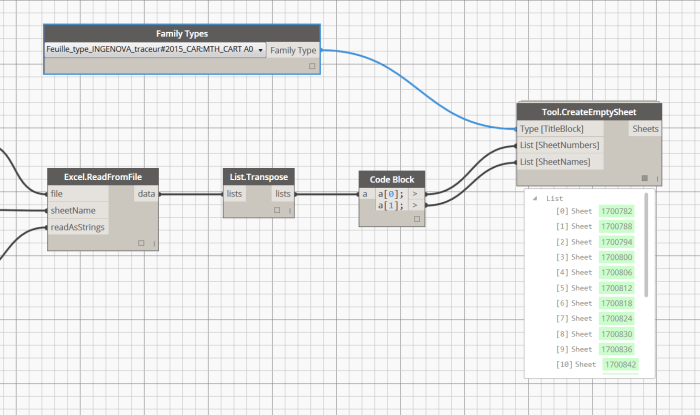
Tool.CreateEmptySheet

From a Title block Family type, this node will create Sheets in the project, with the provided names and numbers. Length of lists will define the number of new sheets. Supposed to be fed with an excel spreadsheet for example.

tool.createemptysheet